Employees have learned to be careful with suspicious emails, so attackers have moved to a place where people relax: workplace chat. A fast-growing Microsoft Teams IT support scam now starts with a flood of spam in the victim’s inbox, followed within minutes by a message from a fake “help desk” account offering to fix the problem. In research published on October 26, 2026, Arctic Wolf Labs reported more than 400 incidents that followed this same pattern, while a separate Sophos investigation linked a related campaign to Chaos ransomware.
This guide explains how the scam works, which fake names and domains to watch for, what the Chaos ransomware connection really is, and how companies and employees can protect themselves.
Microsoft Teams IT Support Scam: Key Facts at a Glance
- Reported by: Arctic Wolf Labs (October 26, 2026) and Sophos (July 2026)
- Scale: more than 400 incidents analyzed by Arctic Wolf
- Method: email bombing, then Teams external chat (and sometimes calls), then a remote access tool
- Speed: in some cases, a payload was running in under 15 minutes after first contact
- Root cause: not a software bug in Teams, but social engineering that abuses external chat access, which is enabled by default
What Is the Microsoft Teams IT Support Scam?
In this scam, criminals create or buy Microsoft 365 tenants, name them to look like IT infrastructure, and message employees of other companies through Teams’ external chat feature. They pose as internal help desk staff and talk the victim into starting a remote support session. Once that session is open, the attacker has hands-on control of the computer and can install malware, steal data, and spread through the network.
Researchers stress that no Teams vulnerability is exploited. The attack works because many organizations leave external access open and because people naturally trust a message that appears inside a company tool.
How the Microsoft Teams IT Support Scam Works, Step by Step
Step 1: Email bombing. The target’s inbox is flooded with hundreds of newsletter signups and subscription confirmations in a short time. This creates a real, stressful problem and a sense of urgency.
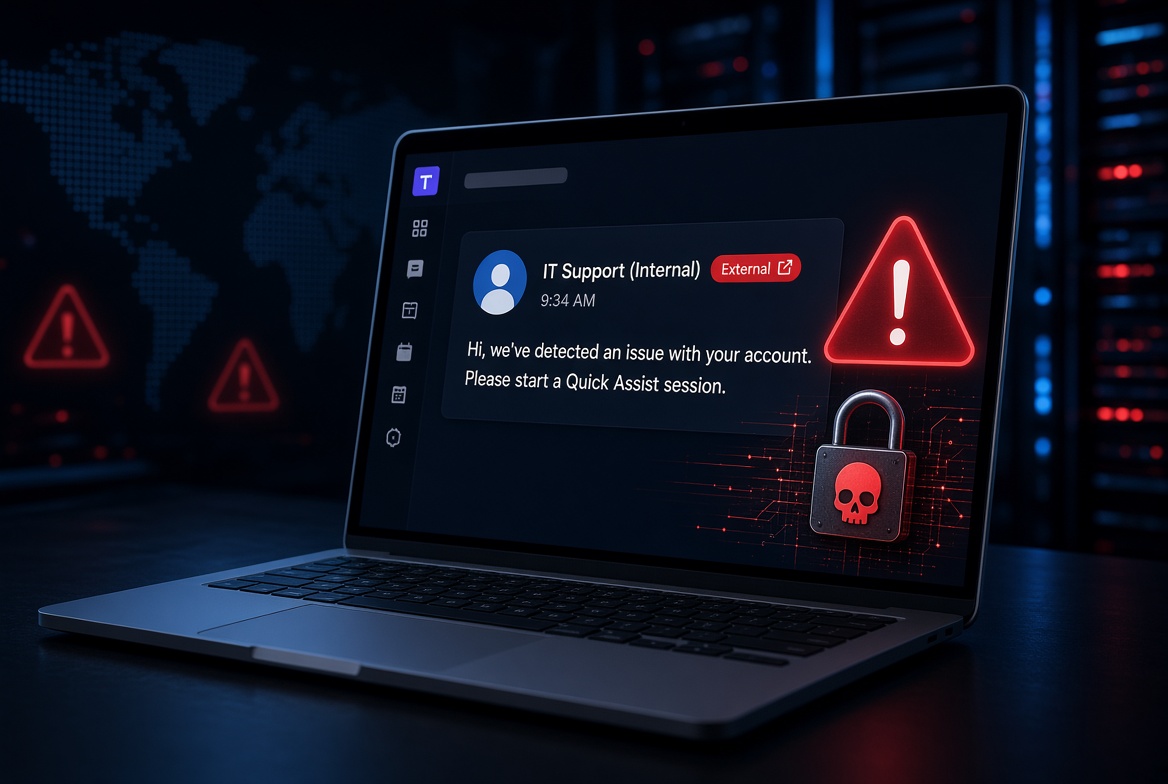
Step 2: A fake IT support contact. Soon after, a Teams message arrives from an account called something like “IT Support” or “Help Desk.” Some campaigns also use Teams voice calls, a technique known as vishing. Sophos observed fake support calls that mostly lasted two to two-and-a-half minutes.
Step 3: The remote access request. The “technician” asks the employee to start a remote session with a legitimate tool. Arctic Wolf and Sophos both point to Microsoft Quick Assist as the most common choice, because it ships with Windows and the victim only needs to read out a six-digit code. Other tools seen in these attacks include AnyDesk, TeamViewer, ScreenConnect, Atera, Zoho Assist, NetSupport, and LogMeIn.
Step 4: Payloads and lateral movement. During the session, the attacker runs PowerShell commands, downloads backdoors, and searches for ways to reach other systems, including domain controllers. Extra remote tools are often installed so the attacker keeps access even if the first one is removed. Data may be stolen before any ransomware is dropped.
Arctic Wolf also noted that attackers usually avoid pasting links into Teams, because that could trigger Microsoft’s Safe Links scanning. Instead, they browse to the payload themselves during the remote session. This means message scanning alone cannot stop the attack.
Fake IT Support Names and Domains to Watch For
The attackers reuse the same tricks again and again, which makes them easier to spot once you know what to look for.
Common display names: Help Desk, IT Support, HelpDesk Manager, HelpDesk Supervisor, IT Service Desk, Enterprise IT & Security (Internal), and IT Tech Support Internal. In newer cases, attackers add the target company’s name to look more convincing.
Fake tenant examples: helpdeskteam365.onmicrosoft.com, itendpoint365.onmicrosoft.com, itcoreportal.onmicrosoft.com, itadmin922.onmicrosoft.com, and corporateitservicellc.onmicrosoft.com.
What the data shows: Arctic Wolf found that roughly 30 to 40 percent of cases used a free onmicrosoft.com domain. Attackers are also shifting to paid domains. Among the paid domains Arctic Wolf identified, about 50 percent used the .top extension, about 40 percent used a standard .com, and just over 5 percent used multi-level domains such as .com.pl, .com.vn, and .com.br.
The label “(Internal)” in a display name is a red flag, not a reassurance. Teams still marks these senders as external, but many employees overlook the warning.
Is the Microsoft Teams IT Support Scam Linked to Chaos Ransomware?
This is where many reports blur two separate pieces of research, so it is worth being precise.
Arctic Wolf’s 400+ incidents describe the overall pattern of fake IT support on Teams. Arctic Wolf did not name a single group behind all of them, and not every case ended in ransomware.
Sophos tracks a related campaign called STAC4749. Between February and June 2026, Sophos saw this group target dozens of organizations, almost all in North America (about 50 percent in Canada and 44 percent in the U.S.). At least three of its intrusions led to Chaos ransomware, and in one case the time from first access to encryption was under 17 hours.
Security reporting says Arctic Wolf’s observed activity aligns with the STAC4749 playbook, including the use of .top domains and IT-themed fake accounts.
Sophos notes that the Chaos ransomware-as-a-service operation has been active since at least February 2025 and was reportedly launched by former members of the BlackSuit (Royal) ransomware group. In May 2026, Rapid7 suggested Chaos might sometimes be used as a false flag by the Iranian group MuddyWater, but Sophos found no evidence connecting STAC4749 to that group and says there is not enough evidence for firm attribution.
The STAC4749 victims were spread across many industries, including services (20 percent), manufacturing (17 percent), energy (12 percent), and construction and engineering (12 percent).
Why This Fake IT Support Attack Works So Well
- Trust in internal tools. People are trained to doubt email, but a chat inside Teams feels like it came from a coworker.
- Perfect timing. The spam flood creates a genuine problem, so an offer of help seems natural rather than suspicious.
- Legitimate software. Quick Assist and similar tools are real, signed programs, so security products may not flag them. Sophos noted that attackers began favoring a lesser-known remote tool in some cases, likely because it is less likely to be on blocklists.
- Speed. Arctic Wolf reported payload execution in under 15 minutes in some cases, leaving little time for a security team to react.
Not New, But Growing: A Short Timeline
The Microsoft Teams IT support scam is an evolution of older “help desk” attacks rather than a brand-new technique.
- May 2024: Microsoft publicly documented attackers misusing Quick Assist and posing as IT support to deliver ransomware.
- Late 2024: Sophos researchers identified similar activity by a threat group associated with Black Basta ransomware.
- January 2025: Sophos reported two campaigns, STAC5777 and STAC5143, that combined email bombing with Teams vishing.
- 2026: Sophos saw a sharp rise in Teams vishing cases in January, with further jumps in March and May, and Arctic Wolf published its 400-plus incident analysis in October.
How to Protect Your Organization From the Microsoft Teams IT Support Scam
- Lock down external access in Teams. Arctic Wolf says most organizations have no real need for open chat with any outside tenant. Allow only trusted partner domains.
- Control remote support tools. Restrict Quick Assist and other remote monitoring tools to authorized IT staff, and use application control to limit unapproved software.
- Monitor endpoints and identities, not just messages. Because attackers avoid sending links in chat, watch for abnormal PowerShell activity, new remote access tools, and unusual sign-ins.
- Watch Teams for warning signs. Investigate unexpected external chats and calls, especially ones that ask someone to start a remote session.
- Audit persistence points. Regularly review registry Run keys and startup items for entries disguised as legitimate software.
- Train employees to verify. Make it a rule that any unexpected IT request is confirmed through a separate channel, such as calling the real help desk number.
What Employees Should Do If They Get a Fake IT Support Message on Teams
- Stop. Do not install anything, read out any code, or share your screen.
- Check whether the sender is marked as external.
- Contact your real IT department yourself using a known phone number or internal channel.
- Report the chat to your security team, even if you did nothing.
Genuine IT staff will not mind being verified.
What to Do If You Already Gave Remote Access
End the remote session and disconnect the device from the network right away. Tell your security team immediately, and do not wait. Change your passwords from a different, trusted device. Security staff should then investigate for backdoors, extra remote tools, and signs of data theft before the device is reconnected.
Final Thoughts
The Microsoft Teams IT support scam shows that attackers go wherever people feel safest. Because it relies on trust rather than a software flaw, technical controls alone are not enough. Restrict external access, limit remote tools, watch endpoints closely, and make “verify before you trust” a habit for every employee.